Abokado Labs · Stock Meter

How's your portfolio actually doing?

Stock Meter is a small macOS menu bar app. It shows your live Robinhood portfolio value, today's change, and your holdings at a glance — read-only, through Robinhood's own official connection, with nothing routed through a server of ours.

Free & open source Read-only. It never places trades.

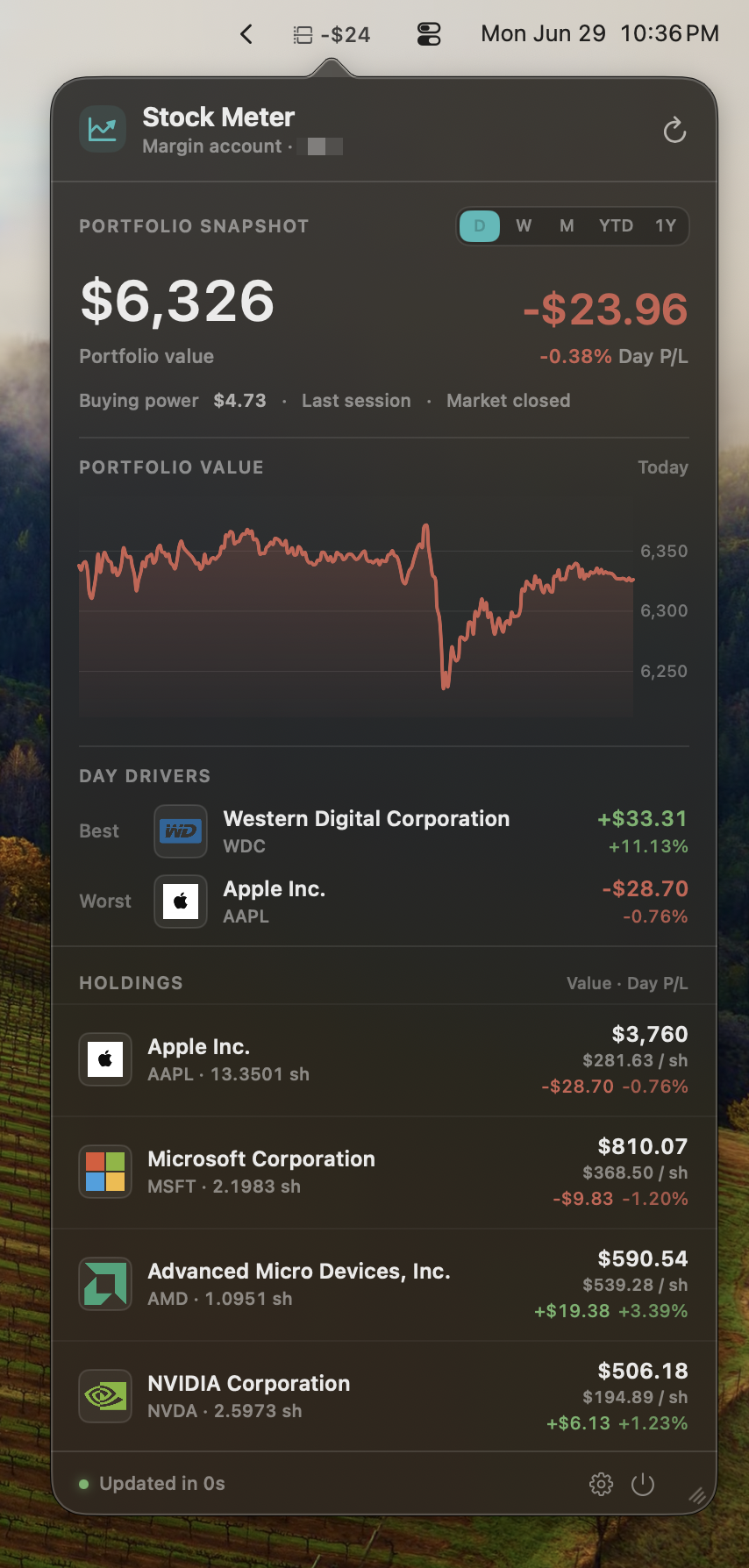
Stock Meter running on macOS — the menu bar showing the portfolio readout, with the popover dropped down beneath it showing portfolio value, the day's profit and loss, a portfolio-value chart, the day's best and worst movers, and a holdings table for Apple, Microsoft, AMD, and NVIDIA.
How it works

One number in the menu bar. The whole portfolio, one click down.

Stock Meter sits in your menu bar showing your portfolio value, or whichever metric you choose. Click it and a popover drops down with the full picture — today's change, buying power, your holdings, the day's top movers, and how fresh the quotes are. It reads your account through Robinhood's own connection and never touches a trade.

Glanceable by design
Your portfolio, next to the clock. Show total value in the menu bar, or pick the metric you care about. Click for day change, buying power, holdings, and the day's top movers. Week, month, year-to-date, and full-year views are built from a local history kept on your Mac.
Read-only, by design
It cannot place a trade. Ever. Stock Meter calls only Robinhood's read-only tools — accounts, portfolio, positions, and quotes. It does not place, review, or cancel orders, manage watchlists, touch options, or rebalance. A local allowlist blocks any tool call outside that read-only set, so "it can't trade" is enforced in code, not just promised.
Robinhood's own connection
You sign in with Robinhood, not a password we keep. Stock Meter connects through Robinhood's official Trading endpoint and an OAuth browser sign-in. Your Robinhood password is never seen or stored by the app. The resulting session lives in your macOS Keychain, alongside which account you've selected.
Local-first, no backend
Your portfolio data never reaches us. Snapshots and history are stored on your Mac, in your Application Support folder, holding masked account details and totals — never tokens or raw account numbers. Nothing about your holdings is sent to an Abokado Labs server. There is no Abokado account and no Abokado backend.
Yours to disconnect
One click wipes it clean. "Disconnect and Clear Local Data" in Settings removes the Keychain session, your selected account, the latest snapshot, and the local history, returning the app to its disconnected state. Multiple brokerage accounts? Choose which one Stock Meter reads in Settings.
Built for macOS
Native menu bar app. macOS 26 or later. Apple Developer ID signed and notarized. Sparkle handles auto-updates. No App Store sandbox concessions, no installer, no helper processes left behind on uninstall.
What it doesn't do

A window, not a remote control.

Stock Meter is built to show, not to act. It is not a trading app and it is not advice. It does not place orders, review or cancel orders, rebalance, write to watchlists, or trade options — and it does not recommend, rank, or suggest what you should buy or sell. The only Robinhood tools it is allowed to call are the four read-only ones that return your accounts, portfolio, positions, and quotes. Everything else is blocked before it leaves your machine.

Download

Available now for macOS.

Stock Meter 1.0 is here — free to download, free to use, free to fork. Your live Robinhood portfolio value, today's change, buying power, holdings, and top movers, a click away in the menu bar. Read-only by design. Signed and notarized by Apple, delivered directly. Updates arrive automatically through Sparkle — no reinstall, no App Store.

Requires macOS 26 or later. Apple Silicon required. Apple Developer ID signed and notarized, distributed directly with Sparkle auto-updates. A Robinhood account is required to connect.

The number you keep checking, without opening the app that tempts you to do something about it.
FAQ

Reasonable questions.

Can Stock Meter place trades with my money?

No. Stock Meter is read-only by design. It connects to only four of Robinhood's tools — the ones that return your accounts, portfolio, positions, and quotes — and a local allowlist blocks every other tool call, including anything that could place, review, or cancel an order. It cannot trade, rebalance, write watchlists, or touch options. "It can't trade" is enforced in the code, not just stated here.

How does it connect to Robinhood? Do you see my password?

It connects through Robinhood's official Trading connection using an OAuth browser sign-in, the same kind of "sign in with…" flow you've used elsewhere. Your Robinhood password is entered with Robinhood, not with Stock Meter — the app never sees or stores it. The session that sign-in produces is kept in your macOS Keychain.

Does my portfolio data go to Abokado Labs?

No. There is no Abokado account and no Abokado backend. Stock Meter talks directly to Robinhood from your Mac, and stores a sanitized snapshot and local history in your Application Support folder so it can show week, month, and year views. Those files hold masked account details, holdings, and totals — never tokens, cookies, or raw account numbers. Nothing about your holdings is sent to us. The app does phone home for one thing: Sparkle update checks.

Is Stock Meter financial advice?

No. Stock Meter displays your own account and market data. It does not recommend, rank, or suggest what to buy or sell, and nothing in it should be taken as financial advice. It's a readout, not an adviser.

Is this made by or affiliated with Robinhood?

No. Stock Meter is an independent app by Abokado Labs. It is not made by, endorsed by, or affiliated with Robinhood Markets, Inc. It connects to your account through Robinhood's own published connection, using only the read-only tools Robinhood exposes for that purpose. "Robinhood" is a trademark of its owner.

I have more than one brokerage account. Which does it show?

You choose. If Robinhood returns more than one account, you pick which one Stock Meter reads in Settings. The selected account identifier is stored in your Keychain and used only as an argument to Robinhood's read-only tools; snapshots only ever contain masked account display details.

How do I remove my data?

Settings → Data → Disconnect and Clear Local Data. That clears the Keychain session, your selected account, the latest snapshot, and the local history in one step, returning the app to its disconnected onboarding state.

Why isn't it on the Mac App Store?

Like the other Abokado Labs menu bar apps, Stock Meter is distributed directly — signed and notarized by Apple, with Sparkle handling updates — so it can run its local connection helper and store its session in Keychain without App Store sandbox concessions.
Open source

Free, MIT‑licensed, contributions welcome.

Stock Meter is open source under the MIT license, alongside Model Meter, Bandwidth Meter, and Weather Meter. For an app that reads a brokerage account, an open codebase is part of the point — you can see exactly which tools it calls and confirm the read-only allowlist for yourself. Read it, fork it, file an issue, or open a pull request.

From the same studio
Model Meter A free macOS menu bar app showing Codex, Claude, and Gemini usage in one glance. Open source, MIT-licensed.

Not affiliated with, endorsed by, or sponsored by Robinhood Markets, Inc. or Apple. "Robinhood" is a trademark of Robinhood Markets, Inc. Stock Meter is an independent app that connects to your account through Robinhood's published read-only connection. Stock Meter is not a broker-dealer or investment adviser and does not provide financial, investment, or trading advice. Market and portfolio data are shown for information only and may be delayed or incomplete; verify in Robinhood before acting on anything. · Privacy · Feedback