Abokado Labs · Model Meter

How much of your AI usage is actually left?

Model Meter is a small macOS menu bar app for people who lean on Codex, Claude, and Gemini all day. It shows how much of your 5-hour and weekly limits you've used, how much is left, and now how the last day and week trended — without opening any of them.

Free & open source MIT-licensed on GitHub.

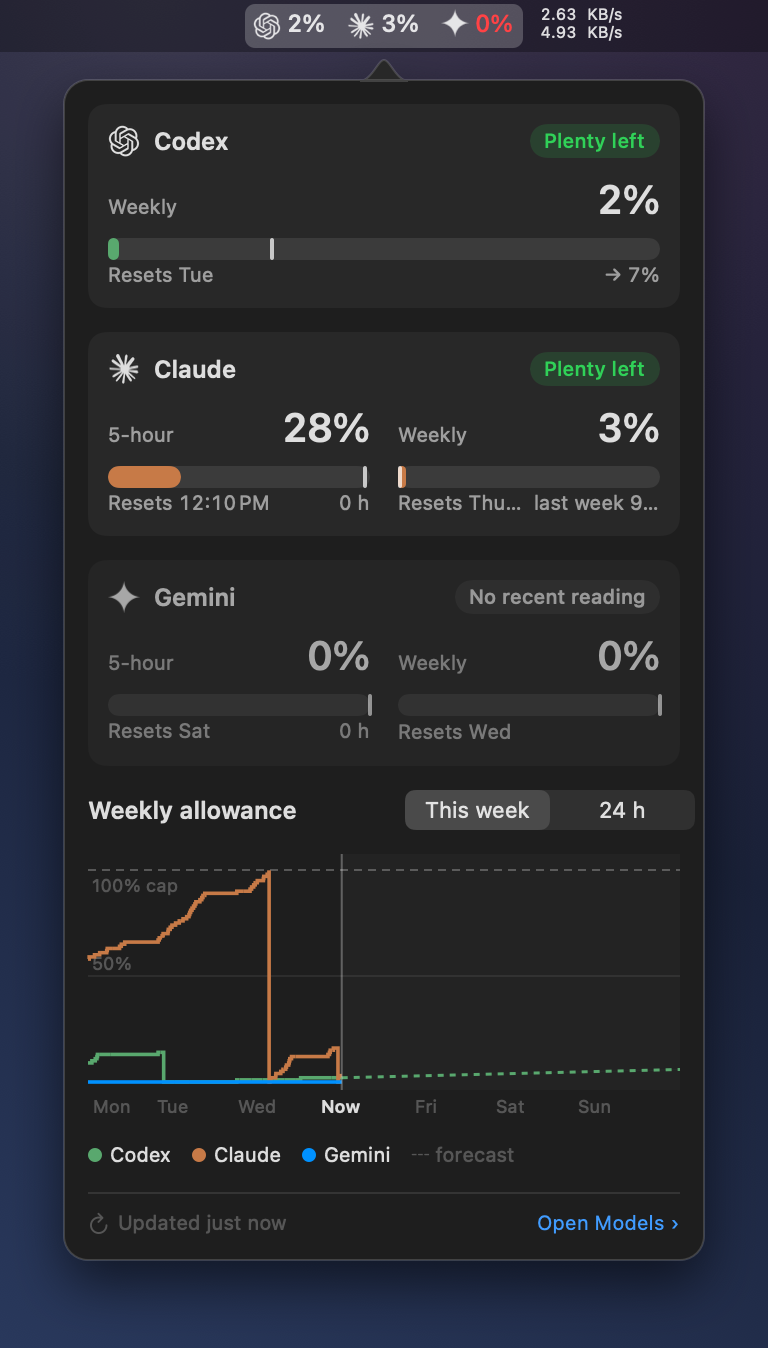
Model Meter running on macOS — the popover open beneath the menu bar, showing a 24-hour usage-history graph at the top, with dotted segments marking pauses, and 5-hour and weekly usage bars for Codex, Claude, and Gemini below, each with reset countdowns and connection status.
How it works

A quiet readout. One click for the rest.

Model Meter sits in your menu bar showing a single line like C 74% · Cl 98% · G 82%. Click it and a popover drops down with the full breakdown: used, available, time left in the current period, next reset, and a history chart of recent readings. Drag the corner to resize it and Model Meter remembers the size. Click anywhere else and it tucks itself away.

Glanceable by design
One line, tuned to taste. Show all three providers side by side, just the lowest one available, a warning only when you're near a limit, or a single icon. Reset labels can read as a live countdown or a calendar date. The popover renders every provider identically so the numbers compare at a glance.
Reads with confidence
You always know how current a number is. Each provider card is labelled: a fresh live reading, a local fallback, or the last good value. When a refresh fails, Model Meter keeps the last good number instead of blanking out, and shows outage, confidence, and pace warnings as separate signals.
Uses Codex's own auth
No separate OpenAI key needed. Model Meter pulls live Codex usage through the credentials Codex CLI already has on your machine (the OAuth tokens at ~/.codex/auth.json) — same authentication, no extra API key, no third-party service. Falls back to local rate-limit snapshots if the live route is unavailable.
Authenticated for Claude & Gemini
Signs in with your own account. Claude credentials live in macOS Keychain; Gemini uses an embedded WebKit session against gemini.google.com/usage. Neither account ever leaves your machine. Disable either provider entirely if you don't use it.
No telemetry
The app phones home for one thing: update checks. Nothing about your usage, your accounts, or your activity is sent anywhere. The Sparkle update check pulls a small XML file from this site and that's it.
Usage history

See where the day went.

The dashboard keeps a short history of every provider's usage — the last 24 hours, or the last 7 days. The line is solid where readings are fresh and goes dotted across any gap longer than thirty minutes, so a pause in usage reads as a pause, not an interpolated guess. When readings resume, the change since the last good value is reconciled. Percentage and time-axis labels keep the trend readable, and the legend follows your menu bar's letters or icons.

  • 24-hour and 7-day views — the recent trend at two scales.
  • Solid where fresh, dotted across gaps over thirty minutes.
  • Pauses shown honestly — no straight line drawn through missing data.
  • Legend follows your menu bar's letter or icon setting.
Model Meter's usage-history chart — '5-hour usage over 24h' with a 24h / 7d toggle, solid-and-dotted trend lines for Codex (green) and Claude (magenta), a 'Dotted = no readings over 30m' legend, and a note that no readings were found for 56 minutes.
Model Meter's redesigned settings panel — sidebar navigation with the Menu Bar tab selected, showing per-provider visibility toggles for Codex, Claude, and Gemini.
Make it yours

Show only what you care about.

Toggle Codex, Claude, or Gemini independently. Pick which percentage shows in the bar — 5-hour used, 5-hour available, weekly used, or weekly available. Switch provider labels between letters (C / Cl / G) and icons. Three font sizes for crowded menu bars.

  • Letters or icons — your call.
  • Reset labels as a live countdown or a calendar date and time.
  • Optional "warn when ahead of pace" turns the value red when you're burning faster than the period's pace.
  • A live preview shows exactly what your menu bar will look like before you commit.
Download

Latest build.

Model Meter 1.2 is live. Free to download, free to use, free to fork. Adds usage history, cleaner provider rows, configurable reset-time display, compact menu bar options, and a resizable menu bar popover that remembers its size. Three providers, side by side. Signed and notarized by Apple, delivered directly. Updates arrive automatically through Sparkle.

Requires macOS 26 or later. Apple Silicon required. Signed and notarized with an Apple Developer ID.

Open source

Free, MIT‑licensed, contributions welcome.

The source lives on GitHub. Read it, fork it, file an issue when something breaks, or open a pull request for features it doesn't have yet. The contributing guide covers setup, scope, and how PRs land.

Three providers, one menu bar slot. The dashboard you'd otherwise have four tabs open for.
FAQ

Reasonable questions.

Does Model Meter use my OpenAI API key?

No. Model Meter reads the OAuth credentials Codex CLI already stores on your machine (at ~/.codex/auth.json) and uses those to fetch live usage from ChatGPT — the same authentication Codex itself uses. Your separate OpenAI API key isn't involved, and Codex usage tracking has no billing implication. If the live route is unavailable, Model Meter falls back to the rate-limit snapshots Codex writes to ~/.codex/sessions.

How does Claude usage get read?

With your permission, Model Meter signs in to Claude through a small in-app web view and stores the resulting session in macOS Keychain. It then calls Claude's authenticated usage endpoint — the same one the Claude website uses to show you your own usage. If Claude ever changes that behavior, the integration may need to be refreshed.

Does it use my Anthropic API key?

No. Model Meter reads usage of your Claude.ai plan, not API consumption. The two are billed separately by Anthropic and the API has its own console.

How does Gemini usage get read?

With your permission, Model Meter loads https://gemini.google.com/usage inside an embedded persistent WebKit session and reads the percentages and reset times Google renders on the page. There's no Gemini API call and no estimation — if Google ever stops showing percentages on that page, Model Meter preserves the last good snapshot and shows Gemini as unavailable rather than guessing. You can clear the session at any time with Reset Gemini session in Settings.

Does it use my Google/Gemini API key?

No. Same shape as Claude: Model Meter reads the consumer Gemini plan's usage page, not API consumption. The Gemini API has its own billing and Google Cloud console.

Why isn't it on the Mac App Store?

Model Meter reads files in ~/.codex and uses WebKit windows for Claude and Gemini sign-in. Both are at odds with the App Store sandbox in ways that would gut the app. So it's distributed directly, signed and notarized by Apple, with Sparkle handling updates.

Is there an iPhone version?

No. The Codex data lives on the machine where you run Codex, which is a Mac. An iPhone version wouldn't have anything to read.

Not affiliated with OpenAI, Anthropic, Claude, ChatGPT, Codex, or Apple. Codex, Claude, and their respective marks belong to their owners. · Privacy · Feedback

From the same studio
Bandwidth Meter A free macOS menu bar app for understanding what your internet is actually doing. Live up/down rates, per-app traffic, outage detection. Version 1.1.1 now available.